


IK Multimedia UNO Drum – Review

UNO Synth gets a new sibling that adds analog and PCM beats to the desktop, touch surface paradigm…
It hardly seems like a year since the UNO Synth was announced. And it is less than a year since it was launched, but here we are, approaching the halfway point of 2019 and IK Multimedia have doubled their hardware instrument presence with the launch of UNO Drum. UNO Synth took a lot of people by surprise with its sheer presence and sonic capability, not to mention its incredibly versatile analog engine and the way it integrates into a software or hardware rig seamlessly. I fell in love with it straight away, as detailed in my review at the end of January. So can UNO Drum have the same impact in an area of electronic instruments that is becoming increasingly populated with some very clever, intuitive tools? Let’s take a look…
At first glance…
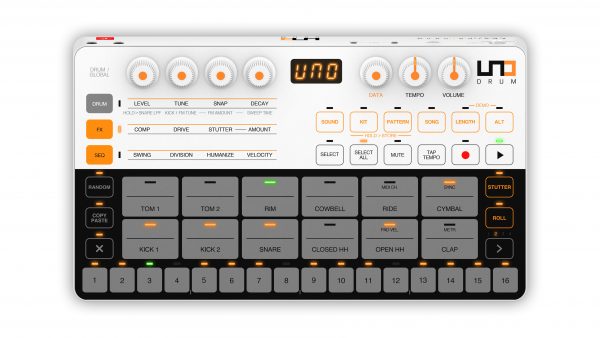
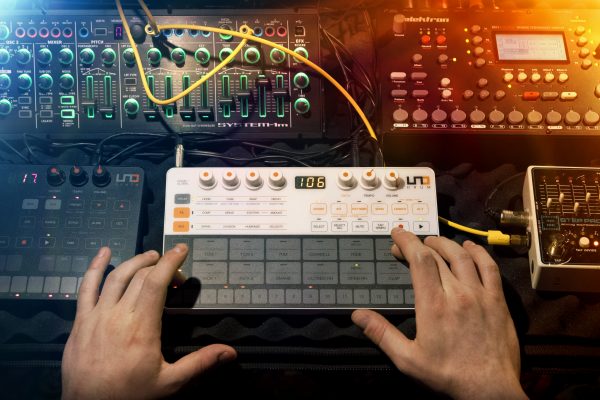
UNO Drum is identical to UNO Synth in respect of its size, dimensions, connections, rotary controllers and display. Where it differs, naturally, is in the control surface which, like UNO Synth, is a capacitive touch sensitive (CapSense) affair. Where UNO Synth was brooding in its black, red and light grey colour scheme, UNO Drum is equally cool in white, orange, grey and black. The design is clean, obvious and easy to navigate as well as being very easy on the eye. What else would you expect from an Italian manufacturer? The layout of “buttons” is well ordered and utilises the same matrix functionality as the UNO Synth. One noticeable difference, aside from the sounds it makes, is with the rotaries. On UNO Synth, all seven were fixed position. On UNO Drum, the four matrix rotaries are now endless encoders, as is the very welcome data entry rotary which is also stepped with a nice, positive and quiet action when you turn it. This is a much nicer way of selecting sounds, kits, patterns and other data fields than the up and down buttons on the Synth. Tempo and Volume rotaries are, like the Synth, fixed.
The three digit LED is identical to the Synth other than it is orange which may be a useful differentiator in a live situation on a dark stage. You wouldn’t want to mistake the Drum’s filter decay for the Synth’s oscillator tuning!

On the rear of the Drum we have a power switch that allows you to choose battery power (provided, once again, by 4x AA cells) or USB, the socket for which is located immediately to the right. The USB connection supports bi-directional data transfer and MIDI, as per usual. Next to this are the 2.5mm TRS MIDI sockets as previously seen on the Synth and which conform to the MIDI Association mini-jack standard. Short adapters are supplied in the box. And at the other end we have the single audio in and out sockets. Sorry kids, no multiple outs on this little beast, I’m afraid. These are both summed mono connections that will happily support mono and stereo 3.5mm TRS plugs although the output and input will always be mono. However, unlike the UNO Synth, the audio in of the UNO Drum does actually pass through the audio processing of the unit, of which we will cover later.
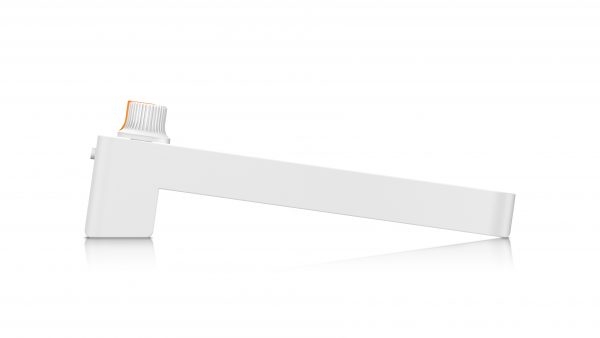
The underside of the unit simply has the battery compartment located in the “foot” of the unit. One noticeable addition, however, is the presence of extra rubber feet at the front of the unit. These provide a much more stable grip on your desktop surface which I guess is more needed on a drum machine, but I would have loved these on my UNO Synth too. I will need to source some, for sure!
Under the bonnet…
So what does this tiny and light unit harbour underneath its durable and well laid out surface? As you might expect, there is analog circuitry at play here, but this time, the analog engine, once again designed and supplied by fellow Italian synth manufacturers soundmachines, is joined by some PCM sounds (allegedly derived from the SampleTank 4 library) and so there is now a slightly broader palette to play with. UNO Drum features 60 different drum sounds, 6 of which are pure analog in origin. These comprise two kicks, a snare, closed hi-hat, open hi-hat and a clap. Each of these are augmented with 4 extra PCM variations per instrument giving you five of each in total. The other six instruments, Tom 2, Tom 2, Rim, Cowbell, Ride and Cymbal have five PCM samples each. It is possible to store up to 100 kit variations in the UNO Drum’s memory and each of these 100 sounds can be manipulated in an almost identical fashion, including level, tuning, snap and decay. The analog snare can also have the low pass filter cutoff adjusted, and Kick 1 is able to have its tuning affected by FM with a variable amount setting, as well as the ability to adjust its sweep time.
There are two audio processing effects on the UNO Drum; compression and drive, the former also being available on the audio input so you can have the same effect applied to incoming audio as well as the Drum itself. Drive adds a bit of distortion if needed.
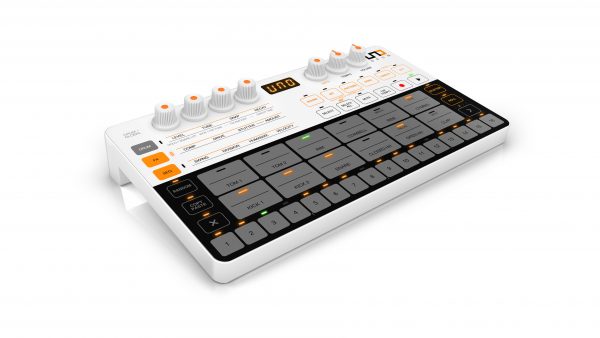
The sequencer is much more capable than that on the UNO Synth. Each pattern can have 1 to 64 steps, spread across four pattern banks. You can store 100 patterns in memory and you can also chain patterns together in Song mode, although at the time of writing, you can only store one Song. Just like UNO Synth, the sequencer can also store automation in each step, although only eight different “lanes”, as opposed to UNO Synth’s twenty. However, UNO Drum has much less to automate, so this is never an issue. UNO Drum also features eleven note polyphony, so you shouldn’t have to worry about note drop outs at all. Kits can be created and stored in any of the 100 available slots for instant recall, but they are not automatically associated with a pattern, unlike UNO Synth. This means that if you start scrolling through patterns whilst the sequence is playing, the kit sounds will remain the same until you change the kit selection, and vice versa. Tempo ranges from 30bpm to 299bpm so that should cover all but the most obscure genres. On top of this, you can adjust the time division between 16th, 32th, 3/4 and 6/8 settings. And for added grooving, there is also a Swing feature. One further adjustment is Humanize, which adds a variable unpredictability element for some random authenticity.
Patterns can be created in step time, real time or a combination of the two.
The drum “pads” each have multiple LEDs and are dual zone velocity capable. The upper half of the pad delivers a higher velocity than the lower half. It’s a bit like having a dedicated accent button per instrument. The LED’s colour denotes whether the pad is selected for editing or muting (green), or triggered (orange). Because of the touch sensitive nature of the control surface, you are limited to these two velocities, much like many early drum machines, but hook up a MIDI controller, be it a keyboard or pads, and each of the drum sounds respond to the full range of MIDI velocities (0-127).
From a performance perspective, there are Stutter and Roll functions, the former giving you a variety (10) of stutter effects and timings for some interesting breaks, and the latter delivering that MPC-style roll which also features different time divisions for anything from simple rolls and fills to the machine gun like effects heard in genres like trap and grime. There is also a Random button that simply delivers a random pattern for the selected instrument across 16 steps, depending on your chosen time division. Don’t like what the UNO Drum gave you? Tap it again for another random pattern until you like what you hear. The Copy/Paste, pattern bank select and Clear buttons make editing all that bit easier.
Finally, the more global-like functions appear on the right. Aside from the obvious record, play, mute and select buttons, you can also adjust pattern length and input tap tempo, as well as select system functions like MIDI channel, sync settings, pad velocity and metronome.
The sound…
Given the pretty comprehensive suite of sequencing and performance tools on offer, the real proof in this little pudding is in the sounds. I guess the focus will mostly be on the analog sounds, given the trend towards these sounds today. Various competitors are putting out true analog or virtual analog boxes all over the place, but none so compact and as sleek and portable as the UNO Drum, and almost none at this price point. So it will be comforting to hear, I would imagine, that these analog sounds are very pleasing on the ear indeed. The two kicks are incredibly satisfying. Kick 1 is a really pleasing thud with a lovely percussive attack and low end. Short and hard. Whereas Kick 2 is very akin to the classic 808 booming kick with a long tail, if you want it. Both handle tuning very well, especially Kick 2 which should more than satisfy anyone looking for that classic, almost chromatic kick sound. The snare is suitably crisp and snappy and the decay knob allows you to tailor it from a proper short slap to something a bit more substantial. The hi-hats are, as you will probably expect, trebly and crisp and the clap more than stands up, although I am sure it might not suit all tastes. There seems to be a lot riding on an analog clap sound, but this is really nice in my humble opinion, and sweeping the decay in real time gives a very satisfying experience as it moves from sharp to almost reverb-y in nature.
The samples were clearly chosen for their old school nature and there are some nice, crunchy and interesting sounds to choose from. It’s a bit of a shame that the toms, rim and cowbell weren’t also analog, but IK have included some distinctly analog samples in there, with a classic 808-style cowbell and a nice, tuneable rim that can, with a bit of fiddling, be coaxed to almost give you that Prince-like down-tuned Linn rimshot. The toms can be made to sound a bit 808 conga-esque and I think that most people will be able to fashion plenty of kits to their liking. But don’t expect any samples here of high quality acoustic drums or percussion. UNO Drum is clearly designed to mimic early drum machines and their rough and ready sounds. Without doubt, plumbing it through a few wisely chosen effects, and UNO Drum will deliver on most expectations. But even on its own, it can certainly hold its own. And its ability to record 8 “lanes” of automation means that you can get a level of expression that could only have been dreamt of by those of us who cut their teeth on some of the early compact rhythm boxes in the 80s.
In conclusion…
I began messing around with drum machines in the early 80s. I first got my mitts on a Boss DR-55, which was far from programmable, but I devised ways of performing with it. I think the next unit I got to play with was a Korg DDD-5, shortly followed by a Casio RZ-1 and it was with these machines that I had a ton of fun with. As an actual drummer, unlike many colleagues, I embraced this new technology, seeing it as an augmentation rather than a threat. In fact, when a band I was in during the late 80s decided to cut their first demo, we recorded it in the sax player’s bedroom studio so we had no room to set up and mic my acoustic kit. I has handed the Korg and came back with three complete songs programmed from beginning to end. I spent hours creating variations of patterns to make it sound more human and really fell in love with the process. And the UNO Drum really reminded me of that for all the right reasons.
UNO Drum is delightfully simple and intuitive. I haven’t even read the manual, which is always my first litmus test for any piece of gear. If I can use it and get satisfying results from it before even reading the manual, I know that it is going to be good. In fact, I was staggered at how rapid and intuitive the device is. And when you hook it up to some speakers, it sounds WAY bigger than its physical size suggests. Whilst I may have referenced some classic Roland machines earlier on, IK Multimedia have not suggested for one moment that UNO Drum is in that league, but I can tell you that for anyone looking for some classic, vintage drum machine action, UNO Drum certainly ticks that box. And hook it up over MIDI to UNO Synth and you have a cracking little groove system right there.
Does it have some downsides? Well, the lack of individual outputs might be considered one, as might the relatively small sound bank. No physical drum pads with full velocity could also put some people off, and the solitary song mode might appear somewhat mean. But when you look at the price point, the design ethos within the range and its actual size, it isn’t hard to see why these things may have fallen by the wayside at the design stage.
I am told that a software editor will appear in a few months. I don’t have any specific details on this, but I really hope that it bears a very close resemblance to the UNO Synth editor which is delivered as a standalone, VST and AU plugin and allows for really useful integration into a DAW-based setup. One can also hope for the newly introduced preset management feature that recently appeared in the UNO Synth editor. If the UNO Drum editor can load, save and manage kits, patterns and songs back and forth from computer to device, it will be most welcome. I’d also love to see the ability to load your own samples, but this will be constrained by how much RAM the UNO Drum contains and if it is even accessible RAM.
There’s not a lot else out there at this price point and with this form factor. Some might argue that units like Arturia’s Drumbrute Impact gives you those multi-outs and a more tactile control surface, but it will likely cost you at least £50 more. But at least we have choice. For something that is portable via a coat pocket, battery powered and still packing an analog punch, with a control surface that will fare much better on the move than anything else, UNO Drum pretty much has you covered.

UNO Drum begins shipping in June 2019 with an RRP of €/$249 ex. Sales Tax and comes with 4x AA batteries, 2 2.5mm to 5-pin DIN MIDI converters and a USB cable. Pre-order now from IK Multimedia’s website for free shipping!


Leave a Reply